Crank through
your timeline.
Turn the crank. See what’s happening.
Get Cranksy · from €3Introductory offer · Choose your price: €3–€10.
One payment. Updates included. Checkout with Stripe.
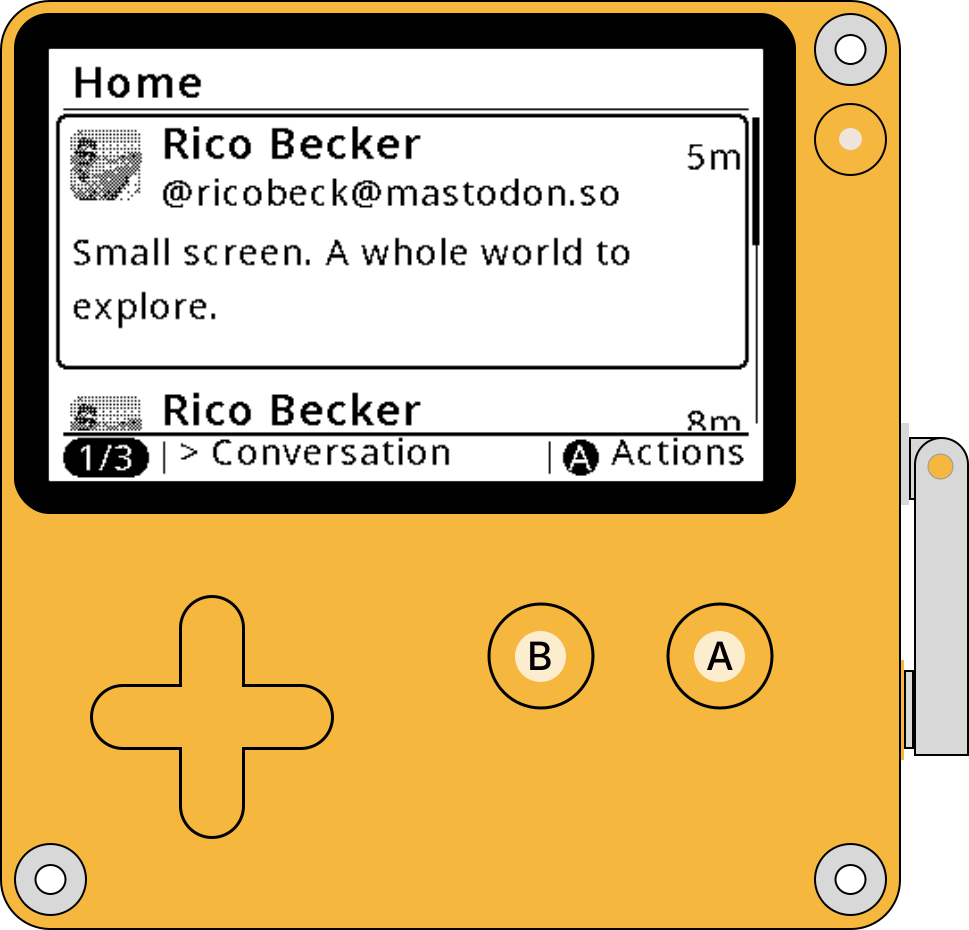
Your Mastodon timeline on Playdate’s little black-and-white screen.
Follow conversations, enjoy 1-bit photos, and favourite or boost the posts you love.
Already bought Cranksy? Download again.
Follow for updates: @ricobeck@mastodon.social.
How to sideload Cranksy
Sideloading just means adding an app to your Playdate. Choose how you’d like to install it.
Online
Install over Wi-Fi using your Playdate account.
- Download Cranksy.Save
Cranksy.pdx.zipafter checkout. Keep it zipped. - Upload it to your Playdate account.Open Playdate Sideload, sign in to the account your Playdate is registered to, and select the ZIP.
- Install on Playdate.Connect to Wi-Fi, open Game Library, refresh the list, then find and download Cranksy.
- Connect your Mastodon account.Open Cranksy, scan the QR code with your phone, sign in, then press A on Playdate to confirm. Start cranking.
Updating? Upload the latest ZIP the same way. Your saved account stays on Playdate.
USB
Use a computer and a USB data cable. No Playdate SDK is needed.
- Unzip your download.Extract
Cranksy.pdx.zip. You’ll copy the wholeCranksy.pdxfolder, not the ZIP. - Connect and enter Data Disk mode.Plug Playdate into your computer. On Playdate, open Settings → System → Reboot to Data Disk and confirm.
- Copy Cranksy.Open the PLAYDATE drive on your computer, then its Games folder. Copy
Cranksy.pdxinto it. - Eject, then start cranking.Safely eject the PLAYDATE drive. Once Playdate restarts, reconnect to Wi-Fi if needed and open Cranksy. Scan its QR code, sign in, then press A to confirm your account.
Updating? Replace the existing Cranksy.pdx in Games. Leave the Data folder untouched to keep your saved account.
USB is for installation. Cranksy still needs Wi-Fi for sign-in and your timeline.
Requires Playdate OS 3.1.2+ and Wi-Fi.
How does it work?
Playdate connects directly to your Mastodon server. You sign in on your phone or computer, then check the account on Playdate and press A to connect.
- PlaydateScan the QR codeOpen your personal Cranksy link.
- Phone or computerSign in on MastodonChoose your server, then approve access.
- Back on PlaydateCheck your account. Press A.You’re ready to crank.
Your password stays with Mastodon. Your account token and private sign-in keys stay on Playdate. This website passes along a one-time authorization code, protected with PKCE. Connection links expire after ten minutes.
Access includes reading your timeline, saving your reading position, favourites and boosts. You can revoke access in Mastodon’s Authorized apps settings.
Your data on Playdate
We do our best to protect the data on your Playdate. Cached downloaded data is encrypted, though someone with full access to your device may still read it.
Choose Forget account to sign out. Cranksy deletes your saved account data, including the sign-in token. It also asks Mastodon to make that token unusable. If either step fails, Cranksy lets you know and offers a retry.
Privacy
We use self-hosted Telekinesis to count page visits and actions. No analytics cookies, visitor IDs, account details or sign-in links are collected.